Showing posts with label 6. Technical prototyping and testing. Show all posts

2008-01-27

need debugging and modification


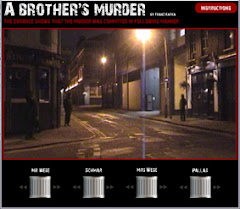
  • From the testing, we found:
    1. The visibility of Instruction button.
    Only one user clicked the instruction button for help.
    2. The dark scroll problem. 2 Users can not wait the murder video finished, and tried to click the dark scrolls at the beginning.


3. There is no navigation to back to intro or the beginning of murder video. If user can not understand the story at first time, they have no chance to watch the video again.

4. Technical problems influenced the result. Interesting to find, 3 of them all started form the right slider “Pallas”. However, owing to the technical problems, each timeline video delayed to responded and very slow. Once they can not find the difference on screen, they loose patient to wait and started to try other scrolls, consequently, felt confused the characters.

5. The scroll control not functioned well. 4 Users clicked the arrows or the scrolls as a button. Only 1 user use mouse and control it well. 1 user clicked the screen directly tried to drag and move characters.Issue 6.: Users felt confused about the characters. The classification of each character was not clear enough from long-shot video.

  • Modification required:

1. Make Instruction button more visible by size and position. Move the position to the right-bottom corner. Most users started the right-bottom slider, when they got stuck, it’s the most visible position.


2. Remove the dark scrolls at the beginning to avoid distraction. Users will finish watching the murder story without distraction, and then start to play with the movie.


3. Add button of “back to intro” and “back to the beginning” allowing user the chance to navigate anytime.

4. Reassure technical modification on coding and all the possible ending combination of videos can go smoothly.

5. Make the double arrow clickable as a functional button. Users can click both the scrolls and the double arrow icons to make a better control.

6. Clarify the characters in video and in scrolls by different colors, make remarkable connection with scrolls. Considering the video can not be shot again, use After Effects editing software to clarify characters in video. Meantime, put photos on sliders and use flash effects and color coding the scrolls.

Usability test

  • I suggested to have test in my flat because it's a student accommendation, even on Sunday, we can find target audience to test.

  • due to the purpose and methadology is different from PP test, we revised Questionnaire

  • Test process and Participants:
    This time, all the team joined the test. Michele was responsible for moderator, taking notes and filming. I tried to find target audience for testing. The others for observers from long distance to avoid too much disturbance.
    In total 5 participants were tested ranging from ages 18 – 28, all studying at University of the Arts, London. Each user considered themselves keen readers and only one seemed to enjoy both reading and gaming. First, the interface played the intro video. After this, the screen displayed the murder video to give them a story background (the scrolls were in dark color which means users can not move them at that time). Then, 4 scrolls appeared brightly on the screen, we observed their response; meantime, the moderator kept on asking them questions.
  • due to the time is rush, the interface has some technicle problems and bugs
  • for ex.: the scrolls will disapear, users can't find where to interact ; the sliders not working

2008-01-18

Paper prototype test

  • 3rd version of PP: fixed on table to make it more like a screen + add control on the left side + draw line on right side to align the first scene + change arrows to be “up” and “down”


Before we started the test, we modify:

  • 5 scrolls and increased policeman layer: Although in final interface we have only 4 scrolls (we put the policeman in the same timeline with Schmar), for paper prototype we have to separate them to control the policeman individually. In this way, we can avoid if Schmar walks on street and policeman appears in wrong timing then cause our users confusing. The same consideration also applied on the policeman layer.
  • color coding characters: for users easy to see different characters movement
  • color coding names on films: for “computer” easy to control during test
  • change arrows to be “up and down”: in our interface, we planned to put characters photos on the scroll for easy identify each character, so we move the arrows out of the scroll.

Test Process and Participants:

I worked with Michele.

My role is a moderator (observation and asking question) and Michele as both computer and narrator at the same time. The whole process was recorded by camera. We found 7 students in LCC, and asked them general questions to do first-stage investigation because we target at readers instead of a game player. 3 of them were our target audience and interested in participating in our test. We conducted the process by making users see the paper prototype covered by a paper which wrote video on it. The narrator described the intro video and uncovered it to ask users to play with the prototype.


Findings:
1. After the intro video, users didn’t know where to look for help when they get stuck, we have to encourage them to touch the scrolls.

2. After trying our products, though they all understood if they move sliders then the story will play on the screen. They felt confused about which scroll represented which character exactly in the video.

3. One user tried to move the sliders by left and right, instead of turn up and down.
4. Only one user mentioned she can change the story and see different ending. The murder will happen or not happen based on the control of sliders. The other 2 users did not grasp the point of interaction with the story.

5. All of them didn’t know the direction of up and down (sliders) represent different timeline would backward or forward.

Recommendations for our interface.

1. Instruction button is necessary. Add one button on the top-right of the screen and pup-up instructions to help users know how to start to interact with this movie.

(photos upload later on Jan. 31)

2. Give clear hint on the scrolls to guide users find characters: change the position of names from bottom to top and change the order of sliders correspondent with characters’ position in video.


3. Change the direction of scrolls to be left and right, allowing users easier to use mouse control the sliders.


4. Use double arrows similar to DVD player to give timeline hint. Guide users the control function of backward and forward.

(photos upload later on Jan. 31)

2008-01-17

Preparation for the Paper prototype


Based on Michele's PP testing script, I made questionnaire, but with some modification.


  • I found the question no.1 and 2 are repeated, so I delete it.

  • I add one question about " Do you like narrative / story ? " If the testers we found are keen readers of narrative, maybe they can give us good suggestions.


Modifications about the paper prototype


  • Before tutorial, the origial prototype:

( 5 layers with Characters' name on it)


  • After the tutorial, some changes were made:
    ( clarify different characters with different color )
    (layers increased from 5 to be 7 layers)

    ( the 3 photos illustrated how to show our users during the test and the screen changes by draging the transparent films)
    (add the triangle signs to guide user to shift the slider here)

  • notes from the tutorial with Mazy:
    1. clarify narrative: make clear that this is a narrative rather than a game
    2. clarify our target audience: the students which is more interested in narratives
    3. script will be helpful
    4. include sound in the paper prototype test (maybe )
    5. slider control: think about give hint to guide the users, let them know how it works
    6. questions for the p.p. testing should be more detailed: for ex., what's your favorite movie or books, what's the last books or movies you read/watch...etc.

First version of paper prototype

Supurised to see the paper prototype Sasha made.
We also disscussed how to explain our idea with this paper prototype during tutorial with Mazy.


2008-01-16

Thinking about Paper prototype

  • Design our paper prototype:
  • Since we want to create our final product as an interactive movie, we came up with how to make our paper prototype displayed in a dynamic way and simulate the real screen and functionality for our users. We use “drag” idea from X’mas card. If user moves the scroll, we will drag the transparent film to demonstrate the movies as they are watching a real interface.
  • purpose:
  • to discover whether our concept works or not and to see if users can grasp the idea of timeline and characters scrolls. (not to test users' understanding of this story, since the timelines video are not available to include and conduct now)
  • to observe how much our product concept can trigger users’ interest and motivation, and also, to receive feedback from them to improve our final product.

  • I also think about the preparation: According to Mazy's lecture, before we start to do the paper prototyping test, I think we need to make sure the following points
  • paper prototype: it's better to storyboard each branch of our narrative, and the choice screens to our storyboard ( will check the prototype tmr, we have time to modify before the tutorial with Mazy at 12:00)
  • the roles in the test: we need to decide
    - moderator: tester, ask questions and write down observations ( I suggest 2 people, one for question, and another for taking notes)
    - computer: operate the prototype according to the participants' choices of each step, don't speak to the user (I suggest 1~2 people, one for the screen, another one for the sliders control)
    - narrator: describe each scene displayed in the prototype and narrate the action represented on the screen
  • practice: ensure the testing process goes smoothly and in case of missing something
  • randomly select the students in LCC to test: at least 3 students


*** during the testing, avoid of describing how to use the control screens, just describe what is happening in each screen.***